YOUR OWN PHOTO BACKGROUND IN UTRECHT
What atmosphere suits your party in Utrecht? With a custom background photo, you can have guests pose for a picture in front of a tropical beach or a romantic dream setting. This way, you give the surroundings behind them a personal touch that aligns with the theme of your wedding or corporate party.
A party in Veenendaal or Zeist? Discover what suits your guests and plans in Utrecht.
You and your guests are the center of attention. With a suitable backdrop, you give your photo its own story.
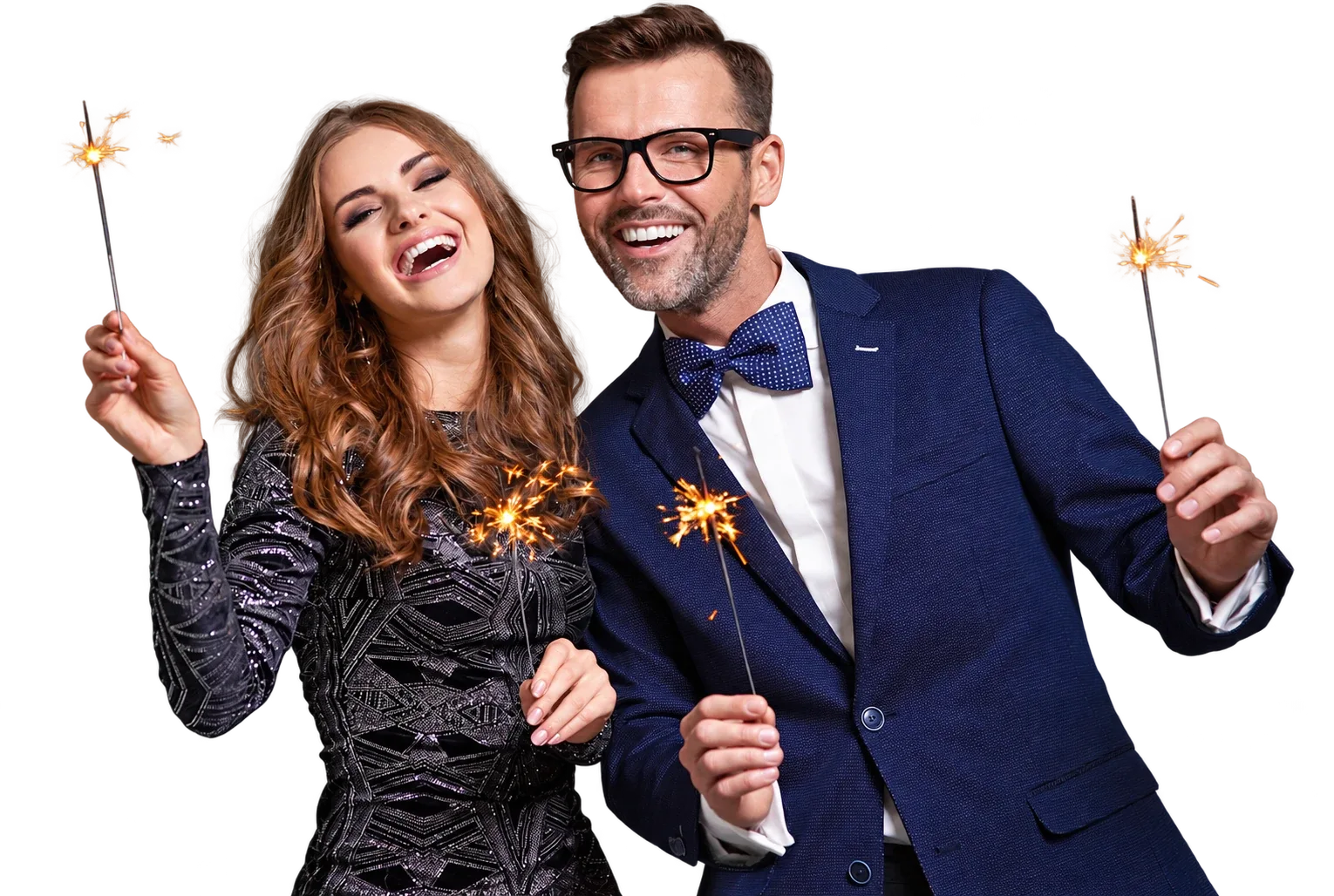
This example combines a photorealistic AI background with the sample people from the wizard. This shows how the chosen backdrop appears behind your guests.
WHAT A DISTINCTIVE BACKGROUND ADDS
SIX SETS TO GET IDEAS
How much difference does a background make? Compare the same sample subjects below in various settings: a sunny beach, a winter landscape, a football stadium, or a romantic city evening. Each image gives the photo a different look.
Give your summer party, birthday, or beach party a tropical atmosphere with palm trees and a turquoise sea in the warm light of the sunset.
For your wedding, a garden in the evening sun forms an atmospheric backdrop. White flowers and warm fairy lights complete the romantic picture.
Let your company party or extravagant theme party be reflected in the photos: mirror balls, golden glints, and purple-blue light set the tone.
Soft morning light falls over snow-covered pines and white mountain peaks. This gives photos of your Christmas party, après-ski, or winter wedding a wintry setting.
This AI rendering of the Johan Cruijff ArenA is perfect for a football or Ajax-themed party. You see red and white stands surrounding a green playing field, illuminated by dazzling stadium lights.
Warm city lights, a river, and the illuminated Eiffel Tower give this decor a romantic feel. A fitting backdrop for your wedding, anniversary, or travel-themed party.
Here you are looking at six photorealistic, AI-generated backgrounds, combined with the sample people from the wizard. The stadium is an AI impression of the Johan Cruijff ArenA. How your photo turns out depends on the shot and the cropping. In the wizard, you can create or upload a background yourself.
GET STARTED WITH THE BACKGROUND WIZARD
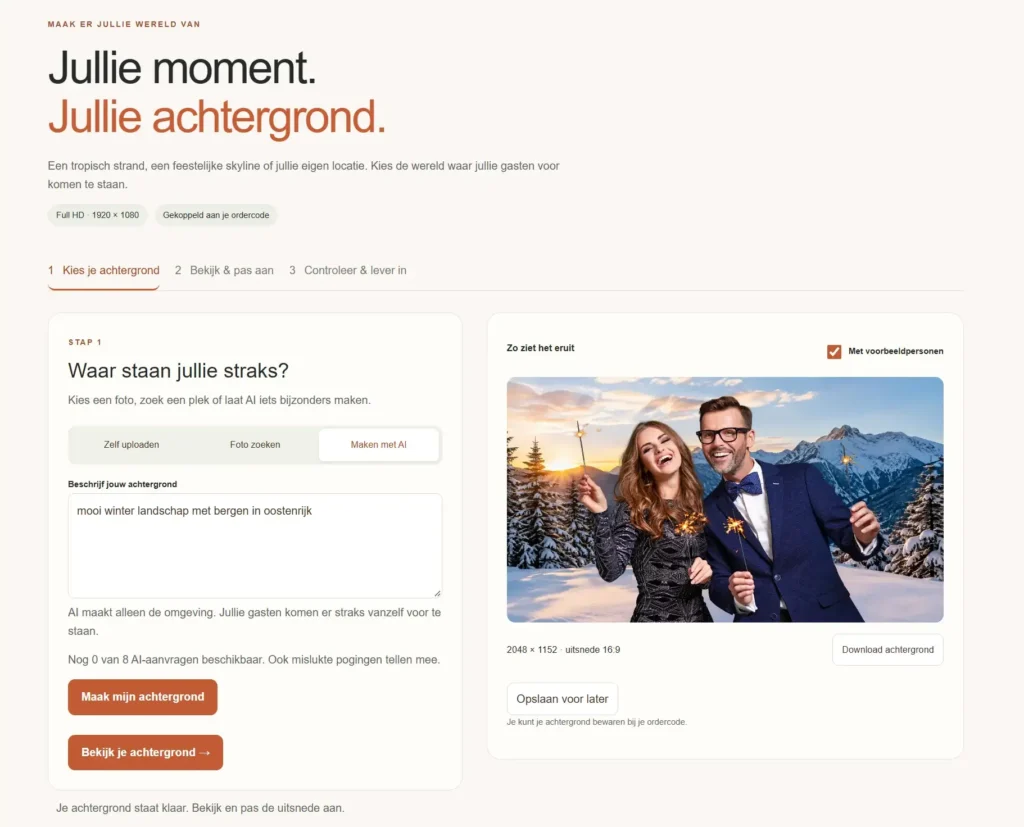
Retrieve the order code from your confirmation and open the wizard. Enter your code there and then click on ‘Aan de slag →’ (Get started).
STEP 1
Use your own photo as a starting point, find a suitable image, or let AI create a new background.
STEP 2
Check where your guests will stand in the background. Adjust the crop until the image is to your liking.
STEP 3
Finished adjusting? Just check if the background and cropping are correct and verify your order code. Then you can submit it definitively.
A DIFFERENT DECOR OR A CUSTOM FRAME?
With this option, you change the decor. behind the people, within the photoThis way, your guests can have their picture taken in front of a tropical beach.
Add the separate option for a custom background photo when booking if you want to use this effect.
With this, you personalize the layout around the photo panelsFor example, include your colors, names, a date, and a logo on the printout.
To do this, select the personalization option that suits your preferences. Discover how personalization works →
A different decor and your own photo design? Then check if you have selected both for your photobooth: the background option and the desired personalization. Please note: a design background with AI is not automatically a green screen background.
THIS IS HOW YOU HELP YOUR BACKGROUND COME INTO ITS OWN DOWN
Preferably use the original file in high quality, not a small internet image or a screenshot. You will find instructions regarding the format and file type in the portal; follow them.
Your guests will soon occupy part of the decor. Therefore, place important details at the top or on the sides, and take that overlap into account when placing text and logos.
Give a group sufficient space in your chosen setting. Pay attention to the horizon and perspective: a calm image with appropriate proportions often works well.
QUESTIONS ABOUT YOUR OWN BACKGROUND
It is a separate option in the configurator. Check availability and any additional charge for your chosen photobooth before booking.
Open the background wizard with the order code from your confirmation. Choose or create a background, adjust the crop and complete step 3. Tick the confirmation box, click ‘Achtergrond inleveren →’ (Submit background) and wait for confirmation. Saving or downloading alone does not submit your background.
A greenscreen background changes the scene behind your guests. Personalisation styles the layout around the photos, for example with names or a logo. They are separate features.
Yes, choose ‘Maken met AI’ (Create with AI) in the wizard. Describe your setting and click ‘Maak mijn achtergrond’ (Create my background). The wizard shows how many requests are available; unsuccessful attempts count too. AI creates the scene without guests. Check the result with the sample people before submitting.
The name describes the effect in the photo. The setup and technology your photobooth needs depend on the model. Follow our setup instructions or contact us beforehand if you want to prepare the space.
Upload a JPG, PNG or WebP of up to 20 MB. The image must be at least 800 pixels on the long side and 600 on the short side. Portrait images are also allowed; you then make a 16:9 landscape crop. The output background is 1920 × 1080 pixels. A larger original generally gives more room for a sharp crop.
Yes. Use ‘Opslaan voor later’ (Save for later) and wait for the message confirming your background is saved with your order code. Reopen the wizard with the same code to continue. Finally, submit the background separately through step 3.
The sample people are only there to preview the effect. Both the download and final background are created without them. Booth Studio places your own guests in front of the setting when taking photos.
The button under ‘Foto zoeken’ (Find a photo) opens Google Images in a new tab. Download the original file there, check the usage rights and upload it using ‘Zelf uploaden’ (Upload your own) in the wizard.
Follow the deadline and instructions in your order confirmation. Is your event coming up soon, or are you having trouble submitting? Please contact us beforehand.
It can be part of your background image, but guests may cover it. Important text or a logo is therefore better placed in the frame, using the appropriate personalisation option.
GIVE YOUR PARTY IN UTRECHT ITS OWN DECOR
Have you already added the background option? Grab your order code and go to the background wizard. If you are still choosing, check which options suit your photobooth.